DNA Info Lab team · Editorial review · · 9 min read
How to Find an rsID in Your 23andMe, AncestryDNA or MyHeritage DNA Data
To find an rsID, search its exact identifier in your raw DNA text file and read the genotype on that row. You can also explore public references in our free rsID lookup without uploading DNA. Checking an uploaded profile is a separate, signed-in action: public reference alleles are not your genotype.
1. Start with an identifier, not a gene name
An rsID is a reference identifier in dbSNP, such as rs1801133. It identifies a variant record, not a person or a diagnosis. A gene can contain many variants. Some chip markers have no rsID: 23andMe’s help explains that it labels those with an internal identifier, i followed by a number. Our lookup accepts one rsID at a time; a gene name, chromosome coordinate or HGVS expression is not an accepted search.
You do not need a DNA file to explore the public reference. To check what your own test recorded, use your original export or a profile you have already uploaded. Our 23andMe, AncestryDNA and MyHeritage download guides explain how to obtain the file. Keep an unmodified copy.
2. Find the row in your raw file
- If the export is a ZIP, extract the text or CSV file before opening it in a plain-text editor. Use Find (Ctrl+F or Command+F).
- Search for the complete identifier, for example
rs1801133. Check the first column exactly: a search for a shorter number may also find another rsID or a coordinate. - Read the genotype from the same row. Check the header for the column names, genome build and any strand information; do not infer these from a filename.
Synthetic examples, not anyone’s results. These two rows come from our downloadable raw-file example. The positions are GRCh37. The first row has a recorded call; the second is deliberately a no-call.
23andMe: the supported text export has four columns, with the genotype in one field. 23andMe reports genotypes on the plus strand of GRCh37 by default and writes -- for a call it could not determine.
| rsid | chromosome | position | genotype |
|---|---|---|---|
| rs4988235 | 2 | 136608646 | AG |
| rs1801133 | 1 | 11856378 | -- |
AncestryDNA: the supported export splits the genotype into allele1 and allele2. Read both. Ancestry’s raw-data guide describes these two allele columns and says genotypes are reported on the forward strand of GRCh37. In this synthetic no-call row, both are 0.
| rsid | chromosome | position | allele1 | allele2 |
|---|---|---|---|---|
| rs4988235 | 2 | 136608646 | A | G |
| rs1801133 | 1 | 11856378 | 0 | 0 |
MyHeritage: our supported CSV export uses RSID, CHROMOSOME, POSITION, RESULT, often with quoted values. Search the exact RSID and read RESULT on the same row. This describes the supported export, not every file a provider might offer: MyHeritage’s own help describes a tab-delimited file with two allele columns, which we read as well. If the structure is unclear, use the free file checker; it processes the file locally in your browser.
3. Explore rs1801133 in the public lookup
- Open the rsID lookup and choose the example with
rs1801133, or enter that identifier and submit. No DNA upload or account is needed for this public search. - Read the requested and returned identifiers, the molecular class, the available reference mappings and the source/date. If the returned identifier differs, verify it in the source before assuming it is interchangeable.
- Use the section links to explore mappings, population frequencies and records/studies. Expand the details you need. The consultation date is not the publication date of the research.
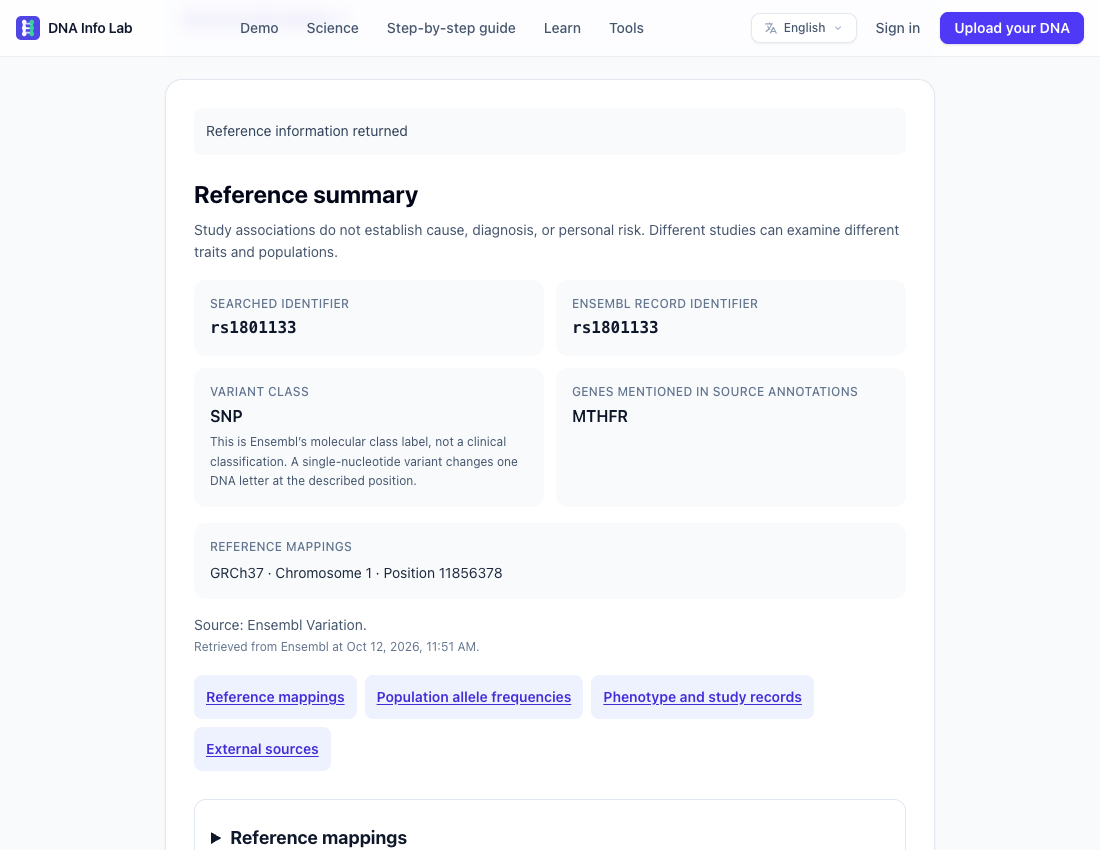
This example shows why the two tasks are separate: the public database can return information about rs1801133 while the synthetic file above has -- at that marker. Finding a public record does not fill in a missing personal call. Ensembl’s worked example also explains why the letters for this variant can differ between genomic and gene-strand descriptions.
4. Read the evidence without turning it into a diagnosis
- Location and alleles: this lookup uses Ensembl Variation GRCh37. Check genome build and strand before comparing coordinates or letters. An rsID match alone does not make those representations equivalent. Explore all returned mappings if there are several.
- Genes: names shown here are genes mentioned in the returned annotations. They are not necessarily genes overlapping the variant, and do not tell you whether a gene works “normally”.
- Population frequencies: these describe alleles in a named reference cohort. They do not reveal your genotype, ancestry or probability of disease.
- Records and studies: check the source and follow the PMID link when present. A p-value is not an effect size or a personal risk estimate. A ClinVar-labelled reference is not a validated clinical classification of your result.
- Filters and counts: filters search only the rows received by this tool. “Show more” reveals more of those rows, not the entire provider database. An empty filter or omitted frequency is not proof that no information exists.
5. Optionally check a profile you have uploaded
After submitting a valid rsID, choose the link to check your own file. Sign in, select a profile belonging to your account and explicitly run the check. If you have no profile, the tool offers the upload route. After a login reload you may need to enter the rsID again. This is an exact-identifier check, not a search for all variants in a gene.
- Found: a genotype was recorded for this exact rsID in the selected profile. It is a file observation, not a confirmed clinical finding.
- No-call: that position was recorded without a usable genotype. Do not replace it with a reference allele or a guessed call.
- Not in the file: the identifier was not found in the retained data for that profile. It does not mean you lack the variant or tested negative for a condition.
- Ambiguous or unavailable: the stored data cannot support a clear answer. Processing state, conflicting rows or limited retained metadata may prevent a determination. Review the original export rather than assuming a negative result.
Privacy: a public lookup sends the rsID to Ensembl through our server; it does not send your DNA file or genotype. The personal check reads the uploaded profile stored on our server and does not send its genotype to that reference provider. It is not browser-local file processing. Uploads and optional AI explanations have separate data flows and consent; read our privacy policy before uploading.
Sources and next steps
Consult NCBI’s dbSNP search documentation for identifiers and assembly-specific positions, Ensembl’s rs1801133 exercise for strand and population examples, and Ancestry’s raw-data guide for its columns and strand convention. Sources checked on 28 October 2026. For broader context, read our interpretation guide and DNA dictionary. Do not change treatment or make health decisions from this lookup; discuss concerning findings with a qualified professional.
Frequently asked questions
Can I search without uploading my DNA?
Yes. Public reference lookup needs only an rsID and no account. It cannot tell you your genotype. Checking an uploaded profile requires sign-in and a separate explicit action.
Why is an rsID missing from my file?
The chip may not have tested that marker, the export may use a different identifier, or the file may be incomplete. This exact-rsID search does not resolve aliases. A missing row is not a negative medical result.
Are -- and 0 the same as a normal genotype?
No. They can mark a no-call in the supported formats: the test did not provide a usable call. The notation depends on the provider. Do not substitute reference alleles.
Do different letters mean the databases disagree?
Not necessarily. Strand conventions and allele representation can differ. Check the same identifier, genome build and strand before comparing; do not automatically flip letters to obtain a match.
Try a public reference search
Start with the rs1801133 example. No DNA upload is needed to explore its reference information.
Open the rsID lookup →Related articles
This article is for educational purposes only and does not constitute medical advice, diagnosis or treatment. Always consult a healthcare professional for decisions about your health.